Cold Email Infrastructure: A Complete Step-by-Step Guide 2026
Cold email infrastructure is the technical foundation that helps your outreach emails land in the inbox instead of the spam folder. Before sending campaigns, businesses need proper domains, inboxes, authentication records, warm-up systems, and deliverability monitoring.
In this guide, we’ll break down the core steps required to build reliable cold email infrastructure for scalable outbound campaigns.
What Is Cold Email Infrastructure?
Cold email infrastructure includes the domains, inboxes, DNS records, sending systems, and monitoring processes used to support outbound email campaigns. A strong setup helps improve deliverability, protect sender reputation, and reduce the risk of emails landing in spam.
Who Needs Cold Email Infrastructure?
Cold email infrastructure is useful for:
- Lead generation agencies
- B2B service providers
- SaaS companies
- Recruiters
- Consultants
- Marketing agencies
If your business relies on outbound email for lead generation, having a reliable infrastructure is essential.
Why Cold Email Infrastructure Matters
A strong email infrastructure design creates a reliable foundation for outbound campaigns.
- Improve inbox placement
- Protect domain reputation
- Reduce spam complaints
- Increase reply rates
- Scale campaigns safely
- Improve overall campaign performance
Many businesses focus heavily on copywriting while ignoring technical setup. In reality, poor infrastructure can prevent emails from ever reaching prospects.
Step 1: Choose Outreach Domains
Avoid sending cold outreach from your main business domain. Use separate outreach domains or subdomains to protect your primary brand domain and reduce risk if deliverability issues occur.
Best Practices
- Use secondary domains for outreach
- Keep branding close to your main domain
- Avoid using newly registered domains too aggressively
- Set up one domain per sending system when needed
Example:
- Primary Domain: Growcliq.com
- Outreach Domains:
- getgrowcliq.com
- growcliqmail.com
- gogrowcliq.com
This approach helps protect your primary brand reputation.
Step 2: Set Up Business Inboxes
Each outreach domain should have properly configured business inboxes. These inboxes should be connected to trusted email providers like
- Google Workspace or Microsoft 365.
Example Inbox Setup
- peter@getgrowcliq.com
- john@growcliqmail.com
- peter@gogrowcliq.com
Best Practices
- Use real human names
- Add profile photos
- Complete sender information
- Create email signatures
Well-configured inboxes improve trust and deliverability.
Step 3: Configure SPF, DKIM, and DMARC
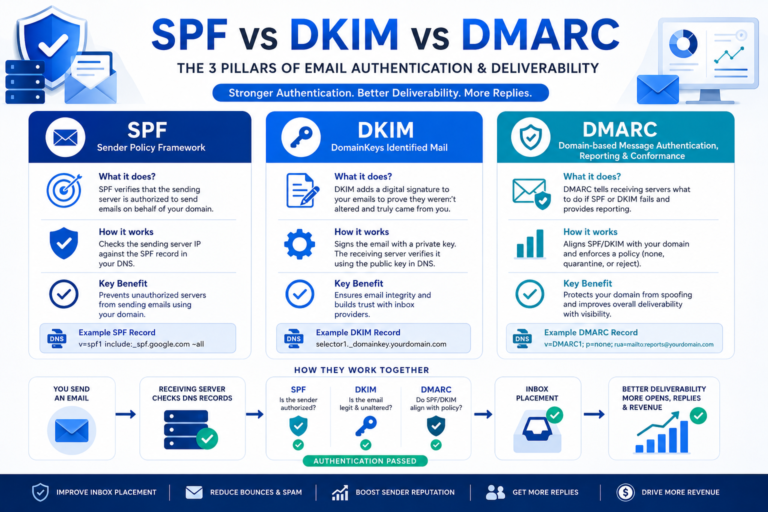
SPF, DKIM, and DMARC are authentication protocols that help mailbox providers verify your emails. Proper email infrastructure configuration ensures mailbox providers can verify your messages and improve deliverability.
- SPF: SPF specifies which servers are allowed to send emails on behalf of your domain.
- DKIM: DKIM digitally signs emails and helps verify message authenticity.
- DMARC: DMARC provides instructions for handling emails that fail authentication checks.
Why It Matters
Without proper authentication:
- Emails may go to spam
- Domain reputation can suffer
- Deliverability rates may decrease
Always verify DNS records before launching campaigns.
Step 4: Connect Sending Software
Cold email campaigns require specialized sending platforms like:
- Instantly
- Lemlist
- Apollo
- Saleshandy
- Smartlead
These tools help manage inboxes, automate campaigns, and track performance.
What to Check:
- Email account connection
- Tracking settings
- Sending limits
- Domain authentication status
Step 5: Warm Up Your Inboxes
Never start sending large volumes of cold emails from a brand-new inbox. Inbox warm-up gradually builds sender reputation.
Typical Warm-Up Process:
- Week 1: 10-15 emails per day
- Week 2: 15-20 emails per day
- Week 3: 20-30 emails per day
- Week 4: 30-40 emails per day
Gradually increasing activity helps establish trust with mailbox providers.
Step 6: Monitor Deliverability
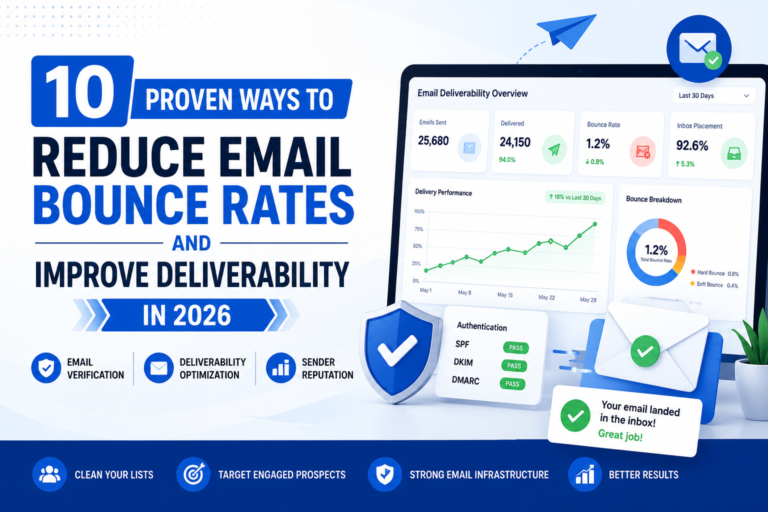
Cold email infrastructure requires ongoing monitoring. Ongoing email infrastructure management is required to maintain domain reputation and inbox placement.
Track metrics such as:
- Inbox placement
- Bounce rate
- Reply rate
- Spam complaints
- Domain reputation
Regular monitoring helps identify issues before they impact campaign performance.
Example Cold Email Infrastructure Setup
The following example demonstrates a typical setup for a business sending approximately 1,000 cold emails per month.
Business Goal: Generate B2B leads through cold email outreach.
Infrastructure:
- 3-5 outreach domains
- 25-30 inboxes Google Workspace
- SPF configured
- DKIM configured
- DMARC configured
- Instantly connected
- Warm-up enabled
- Deliverability monitoring enabled
This type of setup helps distribute sending volume while protecting domain reputation.
Cold Email Infrastructure Checklist
Before launching campaigns, verify the following:
Recommended Tools for Cold Email Infrastructure
Purpose
Tools
Common Cold Email Infrastructure Mistakes
Many businesses make avoidable mistakes that damage deliverability.
Sending From Primary Domain
Always separate outreach from your main business domain.
Skipping Authentication
SPF, DKIM, and DMARC should be configured before sending emails.
Scaling Too Quickly
Increasing sending volume too aggressively may trigger spam filters.
Ignoring Warm-Up
New inboxes require reputation building before large-scale campaigns.
Not Monitoring Performance
Deliverability issues often go unnoticed until campaign results decline.
Conclusion
Cold email infrastructure is the foundation of every successful outbound email strategy. Proper domain setup, authentication, inbox management, warm-up, and monitoring can dramatically improve deliverability and campaign performance. Businesses that invest in email infrastructure optimization typically see better deliverability, lower spam complaints, and improved campaign performance.
Before focusing on copywriting or lead generation, ensure your technical setup is properly configured. A strong infrastructure helps protect sender reputation, increase inbox placement, and support long-term campaign growth.
Need Help Setting Up Cold Email Infrastructure?
GrowCliq helps businesses configure outreach domains, inboxes, authentication records, warm-up systems, and deliverability monitoring for scalable outbound campaigns.
FAQs on Cold Email Infrastructure
What is cold email infrastructure?
Cold email infrastructure is the technical setup behind outbound email campaigns, including domains, inboxes, DNS authentication, warm-up, and deliverability monitoring.
Why is SPF, DKIM, and DMARC important?
These records help email providers verify that your emails are legitimate and reduce the chances of messages being flagged as suspicious.
How many domains do I need for cold email?
The number of domains depends on sending volume. Small campaigns may use 1-2 domains, while larger campaigns often use multiple domains to distribute sending activity.
Can I send cold emails from my primary business domain?
It is generally recommended to use separate outreach domains to protect your primary domain reputation.
Why are SPF, DKIM, and DMARC important?
These authentication protocols help mailbox providers verify that emails are legitimate and reduce the likelihood of messages being flagged as spam.
How long should email warm-up last?
Most businesses warm up inboxes for 2-4 weeks before scaling outbound campaigns.
Which tools are best for cold email infrastructure?
Popular tools include Google Workspace, Microsoft 365, Instantly, Lemlist, Mailreach, MXToolbox, and Google Postmaster Tools.