10 Proven Ways to Reduce Email Bounce Rates and Improve Deliverability in 2026
Email bounce rates can quickly become a deliverability problem in cold outreach. When too many emails are sent to invalid, inactive, full, or unreachable mailboxes, campaigns waste sending capacity and can create negative signals around your sending activity.
If you’re trying to reduce email bounce rates, the solution isn’t simply removing bounced contacts after a campaign. Effective email bounce rate reduction starts before sending with better prospect data, email verification, list hygiene, infrastructure configuration, and ongoing monitoring.
In this guide, we’ll explain why cold emails bounce, the difference between hard and soft bounces, and how to reduce bounce rates in cold email campaigns before they affect your outreach performance.
What Is an Email Bounce?
An email bounce happens when a message cannot be successfully delivered to the recipient’s mailbox and is returned or rejected by the receiving mail system.
In cold email outreach, bounces commonly happen because the email address is invalid, the mailbox no longer exists, the receiving server rejects the message, the mailbox is temporarily unavailable, or the sender encounters a deliverability-related issue.
Not every bounce means the same thing. Understanding whether you’re dealing with a hard bounce or soft bounce is important because the appropriate response is different.
Why Poor List Quality Hurts Deliverability
Poor list quality can significantly impact email deliverability and sender reputation.From managing outbound email campaigns, one common mistake businesses make is sending emails to unverified contact lists. Even a small percentage of invalid addresses can increase bounce rates, damage sender reputation, and reduce inbox placement. Mail providers such as Gmail and Outlook use engagement and delivery signals to determine whether future emails should reach the inbox or spam folder.
Common consequences include:
- Reduced inbox placement
- Increased spam folder placement
- Lower sender reputation
- Domain trust issues
- Email account restrictions
- Poor campaign performance
If bounce rates remain high for an extended period, email providers may view your domain as risky, making future campaigns less effective.
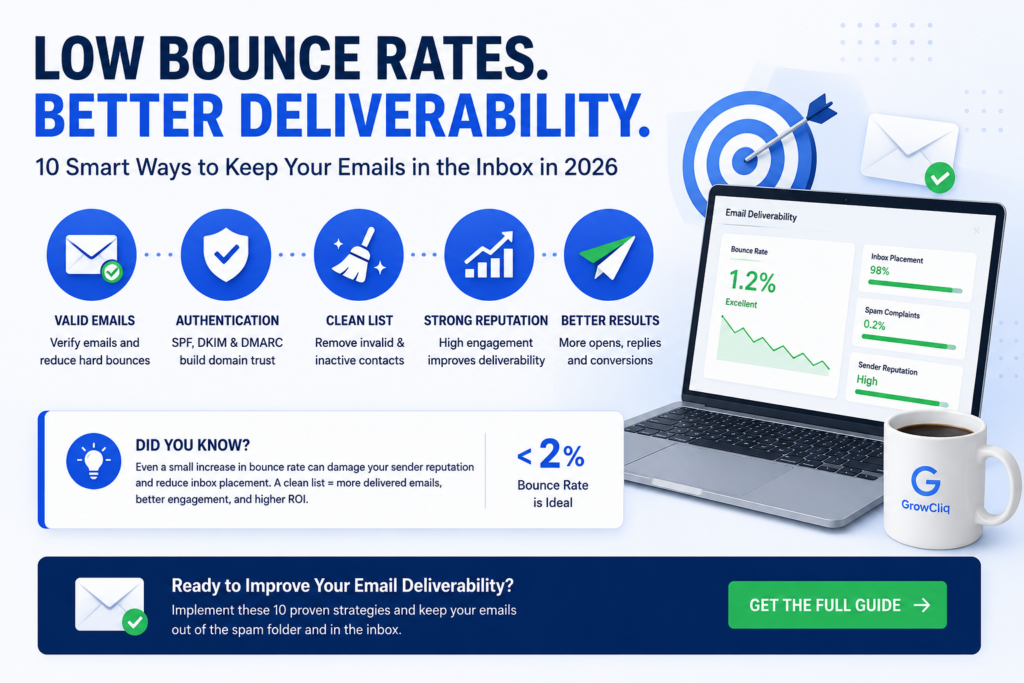
How to Reduce Email Bounce Rates in Cold Outreach
Reducing email bounce rates requires more than removing failed contacts after a campaign has already been sent. A stronger approach is to prevent avoidable bounces before outreach begins.
For cold email campaigns, this means combining accurate prospect data, email verification, regular list cleaning, properly configured sending infrastructure, controlled campaign activity, and ongoing bounce monitoring.
The following steps explain how to reduce bounce rates in cold email campaigns while maintaining a cleaner and more reliable outbound system.
1. Validate Email Addresses Before Sending
One of the most effective ways to reduce avoidable hard bounces is to verify prospect email addresses before adding them to an active campaign.
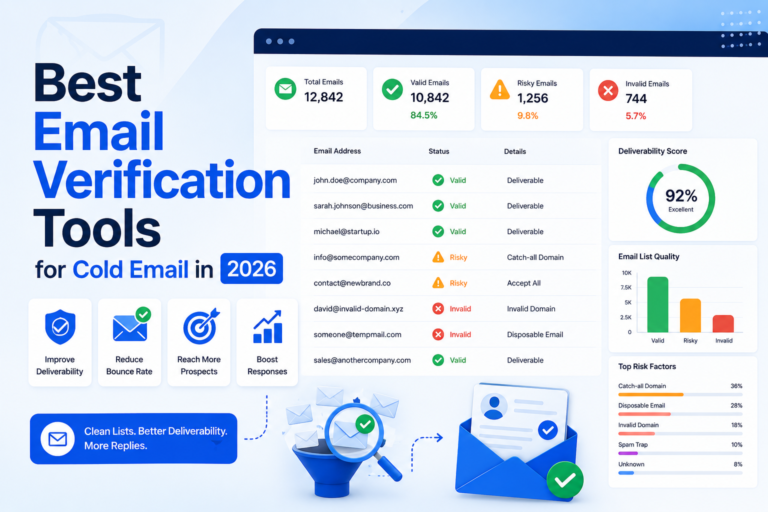
Email verification tools can help identify addresses that may create delivery problems, including:
- Invalid email addresses
- Misspelled addresses
- Disposable email accounts
- Invalid domains
- Catch-all domains
- Unknown or risky addresses
Verification becomes especially important when contact data comes from older databases, prospecting platforms, enrichment tools, scraping processes, or lists that have not been reviewed recently.
However, email verification should be treated as a risk-reduction step rather than a guarantee of delivery. A mailbox can change after verification, catch-all domains can create uncertainty, and receiving servers still make their own delivery decisions.
Recommended tools:
2. Why Do Verified Emails Still Bounce?
An email address passing verification does not guarantee that every message will successfully reach the recipient.
Verification tools assess whether an address appears deliverable when it is checked, but email environments can change quickly.
A verified email may still bounce because:
- The mailbox was disabled after verification
- The employee recently left the company
- The recipient’s mailbox is full
- The receiving server temporarily rejects the message
- The domain uses a catch-all email configuration
- The sending account or domain is rejected by the receiving system
- The verification provider classified an uncertain address as deliverable
This is why verification should work alongside list hygiene, bounce monitoring, sending controls, and properly configured email infrastructure.
If verified addresses continue to bounce, look at the actual bounce messages and patterns rather than assuming the verification tool is always the only cause.
3. Consider a Second Verification Check for Uncertain Addresses
Double verification in cold email is different from double opt-in used for newsletters or permission-based marketing lists.
In cold outreach, double verification generally means checking an email address with a second verification provider when the first result is uncertain.
A second verification check may be useful for:
- Catch-all addresses
- Unknown verification results
- Older prospect lists
- High-value contacts where additional validation is worthwhile
- Data coming from sources with inconsistent accuracy
However, it is not automatically necessary to run every verified contact through multiple tools.
Different verification providers use different data and validation methods, so the greatest value of a second check is usually in reviewing uncertain or higher-risk addresses rather than repeatedly verifying an entire clean list.
4. Improve and Clean Your Email List Regularly
Email bounce rate reduction starts with the quality of the contact data entering your campaign.
B2B data naturally becomes outdated as employees change jobs, companies close, domains change, and previously active mailboxes become unavailable. Lists collected months ago may therefore contain addresses that were once valid but are no longer safe to use.
Before launching a cold email campaign:
- Remove duplicate contacts
- Correct obvious formatting errors
- Verify professional email addresses
- Review older or stale prospect data
- Separate risky, catch-all, or uncertain addresses
- Remove addresses that previously hard bounced
- Avoid automatically sending to every address collected
Rather than following a fixed cleaning schedule for every campaign, review and verify lists based on how old the data is, where it came from, and whether previous sending results show signs of declining quality.
A smaller and more accurate prospect list is usually more valuable than a large database containing outdated or questionable addresses.
5. Understand Hard Bounce vs Soft Bounce
Not all email bounces mean the same thing. Understanding whether a delivery failure is permanent or temporary helps you decide whether an address should be removed, monitored, or retried.
Hard Bounce
A hard bounce is a permanent delivery failure. It generally means the email cannot be successfully delivered to that address.
Common causes include:
- Invalid email address
- Non-existent domain
- Deleted or disabled mailbox
- Incorrectly entered email address
- Permanent rejection by the receiving server
Hard-bounced addresses should generally be removed from future campaigns rather than contacted repeatedly.
Soft Bounce
A soft bounce is usually a temporary delivery failure.
Common causes include:
- Full recipient mailbox
- Temporary receiving-server problems
- Message size restrictions
- Temporary mailbox unavailability
- Other short-term delivery issues
A single soft bounce does not necessarily mean the address is invalid. However, repeated soft bounces should be monitored and investigated instead of being ignored.
Understanding the difference between hard and soft bounces helps you maintain cleaner prospect lists and make better decisions when trying to reduce email bounce rates.
6. Check Your Cold Email Infrastructure and Authentication
Not every email bounce originates from a bad prospect address. Problems with your sending domains, inboxes, authentication, or sending configuration can also contribute to delivery failures.
Every sending domain should have the appropriate email authentication configured.
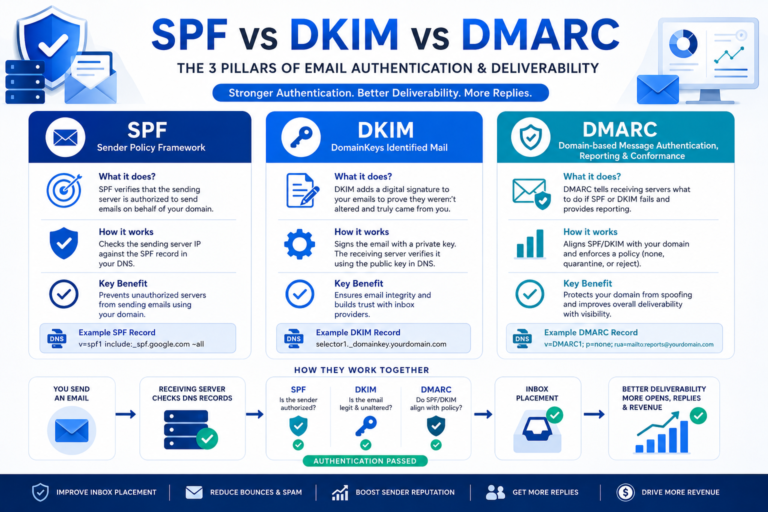
SPF
SPF identifies which mail servers are authorized to send email on behalf of your domain.
DKIM
DKIM adds a cryptographic signature that allows receiving systems to verify that a message was authorized by the domain and was not altered during delivery.
DMARC
DMARC works with SPF and DKIM and provides domain owners with a policy and reporting framework for handling authentication results.
Authentication alone does not guarantee inbox placement or eliminate bounces. It should be part of a broader cold email infrastructure that includes properly configured sending domains, dedicated inboxes, controlled sending behavior, verified contact data, and ongoing monitoring.
If bounce rates increase across otherwise clean prospect lists, investigate your sending setup as well as your contact data.
Read our Cold Email Infrastructure Guide to learn how domains, inboxes, authentication, sending platforms, and monitoring work together in an outbound system.
You can also read our SPF vs DKIM vs DMARC Guide for Cold Email for a deeper explanation of each authentication method.
7. Maintain a Strong Sender Reputation
Sender reputation is one of the most important factors influencing deliverability.
If you’re seeing declining inbox placement, our guide on Cold Email Infrastructure explains how domains, inboxes, SPF, DKIM, and DMARC impact sender reputation.
Mailbox providers monitor:
- Bounce rates
- Open rates
- Reply rates
- Spam complaints
- User engagement
To maintain a strong sender reputation:
- Send only to verified contacts
- Avoid purchased lists
- Monitor bounce rates regularly
- Keep engagement levels high
A strong sender reputation improves inbox placement and campaign performance.
8. Avoid Spam Trigger Words
Spam filters evaluate email content before allowing messages into inboxes.
Common spam-triggering phrases include:
- Free money
- Guaranteed income
- Risk-free
- Act now
- Limited-time offer
Instead of relying on promotional language, focus on writing clear, relevant, and personalized messages.
This improves both deliverability and response rates.
9. Segment Your Email Audience
Sending the same message to everyone often increases bounce rates and lowers engagement.
Segment your audience based on:
- Industry
- Company size
- Location
- Job title
- Past engagement
Audience segmentation leads to more relevant campaigns and improved deliverability.
10. Test Emails Before Every Campaign
Always test emails before launching a campaign.
Testing helps identify:
- Formatting issues
- Broken links
- Authentication problems
- Spam filter triggers
Useful testing tools include:
- Mail Tester
- GlockApps
- Litmus
Testing before sending can prevent delivery issues and improve overall campaign performance.
11. Choose a Reliable Email Service Provider
Your email service provider plays a major role in deliverability.
Reliable providers offer:
- Strong infrastructure
- Reputation management
- Bounce handling
- Authentication support
- Deliverability monitoring
Popular options include:
- Google Workspace
- Microsoft 365
- Mailchimp
- HubSpot
- Brevo
Choosing a trusted provider helps improve inbox placement and reduce email bounce rates.
What to Do If Bounce Rate Suddenly Increases
f your bounce rate suddenly increases, avoid simply continuing to scale the campaign without investigating what changed.
Start by checking:
1. Recent Prospect List Sources
Determine whether a recently added database, enrichment source, scraping process, or prospecting platform introduced lower-quality addresses.
2. Email Verification Results
Review how the verification tool classified invalid, unknown, risky, and catch-all addresses. Pay particular attention to contacts that were allowed into the campaign despite uncertain results.
3. Actual Bounce Messages
Look at the rejection reasons returned by receiving servers instead of treating every bounce as the same problem. This can help distinguish invalid addresses from temporary failures or sending-related issues.
4. Sending Accounts and Domains
Check whether the increased bounce rate is occurring across all sending accounts or is concentrated around a particular domain or inbox.
5. Authentication and Infrastructure
Confirm that SPF, DKIM, DMARC, sending domains, and inbox configurations are still working as expected.
6. Recent Campaign Changes
Review whether you recently changed sending volume, prospecting sources, email providers, tracking settings, sending software, or campaign configuration.
Determining whether the problem comes from contact data, receiving servers, or your sending infrastructure is more useful than simply deleting bounced addresses and continuing the campaign.
Tools That Can Help Reduce Email Bounce Rates
Different parts of your outbound workflow can contribute to bounce-rate reduction. Instead of relying on one tool, consider the role each category plays.
Email Verification Tools
Verification platforms can help identify invalid, disposable, risky, or uncertain email addresses before campaigns begin.
Prospecting and Data-Enrichment Tools
Prospecting platforms can help teams find and update business contact information, but sourced data should still be reviewed and verified before large campaigns.
Cold Email Platforms
Outreach software can help manage sending accounts, campaigns, bounce handling, and campaign-level monitoring.
Deliverability Monitoring Tools
Deliverability tools can help investigate authentication, sender reputation, inbox placement, and other technical issues that may affect campaign performance.
Tools are only part of the solution. List quality, verification rules, email infrastructure, and sending behavior still determine how reliably an outbound system performs.
For a detailed comparison of verification platforms, see our Best Email Verification Tools for Cold Email guide.
Email Bounce Rate Checklist
Before launching any campaign, verify the following:
- Email addresses verified
- SPF configured
- DKIM configured
- DMARC configured
- Email list cleaned
- Campaign tested
- Sender reputation monitored
- Audience segmented
- Spam trigger words avoided
- Bounce rates reviewed
Common Deliverability Mistakes
Buying Email Lists
Purchased lists often contain outdated or invalid addresses.
Skipping Email Verification
Sending to unverified contacts increases bounce rates.
Ignoring Hard Bounces
Hard bounced contacts should be removed immediately.
Poor Authentication Setup
Missing SPF, DKIM, or DMARC records can hurt deliverability.
Not Monitoring Sender Reputation
Failing to monitor sender reputation can lead to inbox placement issues.
Final Thoughts on Reducing Email Bounce Rates
The most effective way to reduce email bounce rates is to prevent avoidable delivery failures before campaigns are launched.
Start with accurate prospect data, verify email addresses before sending, remove invalid contacts, monitor uncertain addresses carefully, and maintain properly configured sending infrastructure.
Once campaigns are running, review the actual reasons behind delivery failures instead of treating every bounce the same way. A sudden increase may come from outdated prospect data, recently changed mailboxes, receiving-server issues, or problems within your sending setup.
For cold outreach, email bounce rate reduction should be treated as an ongoing process rather than a one-time list-cleaning task. Contact information changes, employees move companies, mailboxes become inactive, and sending environments evolve.
Combining clean data, verification, proper infrastructure, controlled sending, and ongoing monitoring gives your outbound campaigns a much stronger foundation.
Bounce rate is also only one part of campaign health. Prospect targeting, messaging, infrastructure, follow-ups, and reply management all contribute to the performance of cold email outreach for agencies.
Frequently Asked Questions
How do you reduce email bounce rates in cold outreach?
To reduce email bounce rates in cold outreach, start with accurate prospect data, verify addresses before sending, remove invalid contacts, review uncertain or catch-all addresses carefully, and monitor your sending infrastructure. After campaigns begin, review bounce reasons so you can identify whether problems come from the contact data, recipient mailbox, or sending setup.
What causes high email bounce rates?
High bounce rates can result from invalid or outdated email addresses, poor list quality, inactive mailboxes, temporary receiving-server problems, incorrect addresses, or issues with the sending setup. Reviewing the actual bounce reason is important because not every failed delivery has the same cause.
Why do verified emails still bounce?
Email verification only indicates whether an address appears deliverable when it is checked. A mailbox may later become inactive or full, an employee may leave the company, a receiving server may temporarily reject the message, or a catch-all domain may behave differently when the message is actually sent.
How can I reduce hard bounces in cold email?
Verify prospect addresses before sending, keep contact data current, remove previously hard-bounced addresses, and avoid sending automatically to questionable or outdated contacts. Improving list quality before a campaign is generally more effective than cleaning up large numbers of bounces afterward.
Is double verification necessary for cold email?
Not always. A second verification provider can be useful when an address receives an uncertain, risky, or catch-all result. Contacts that already receive confident verification results do not necessarily need to be repeatedly checked with multiple tools.
Can cold email infrastructure cause email bounces?
Yes. Invalid email addresses are a common cause, but sending-domain issues, mailbox configuration, authentication problems, temporary server rejections, and other infrastructure-related problems can also contribute to failed deliveries.
Do SPF, DKIM, and DMARC prevent email bounces?
SPF, DKIM, and DMARC help receiving systems authenticate messages, but they do not guarantee that an email will be delivered or prevent every type of bounce. They should be combined with good list quality, properly configured sending accounts, and responsible sending practices.
What should I do if my cold email bounce rate suddenly increases?
First review the source and age of your prospect data, verification results, and actual bounce messages. Then check whether the problem is concentrated around specific sending domains or inboxes and confirm that your authentication and infrastructure settings are still configured correctly.